
Google Calendar Pro

Use Google Calendar Pro to connect public or private Google Calendars securely with OAuth2, customize caching, and enhanced options.

  • Display Private Events
  • Colour-coded Events
  • Grid and List View
  • Month View
  • A1 Customer Support

Purchase Google Calendar Pro

Check out the BUNDLE and secure BIG SAVINGS for all kinds of personal & business events.

Bundle & save

Tap into exclusive savings with our bundle deals, or just purchase this addon.

Get addon

$59 - $179 yearly

Tap into exclusive savings with our bundle deals

Standout features

Browse the features of Google Calendar Pro Plugin

Fetch Google Calendar event colors

It directly integrates with the same event colors you set on your Google Calendar events, while helping in better organization and categorization of multiple events display.

Works with private and restricted calendars

Connect private Google Calendars and display events without exposing them to the public web. Share events safely while retaining complete control over visibility.

Display event previews

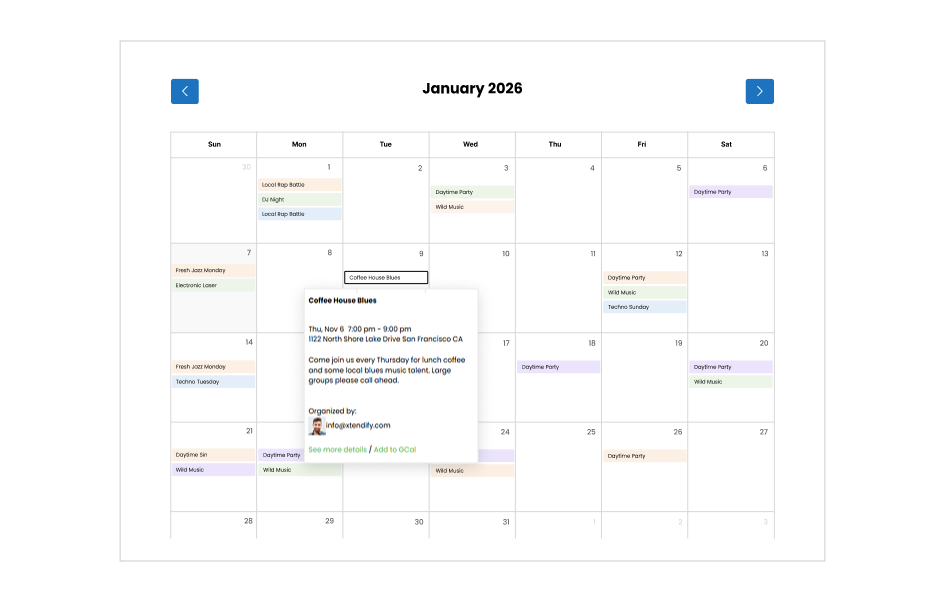
With image previews, anyone browsing your calendar can instantly see a visual snapshot of an event simply by hovering over it, making your calendar more engaging to explore.

Event template tags

Use simple, shortcode-like tags to choose exactly what information gets displayed, from titles and descriptions to links and more. Take full control of how your Google Calendar events appear on your site.

WordPress-native control and styling

Control layout, design, and placement using Simple Calendar settings and shortcodes. The booking experience matches your site.

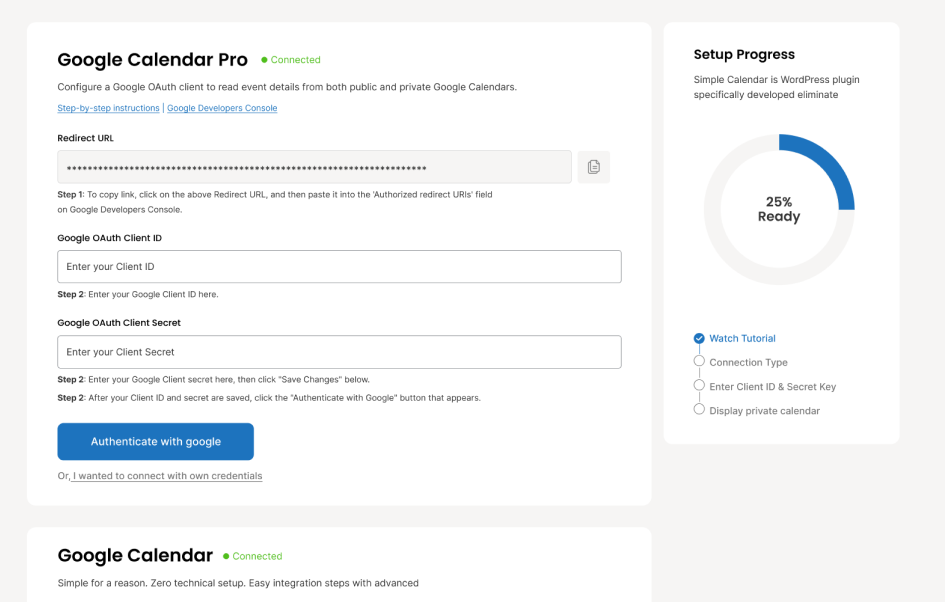
Secure authorization with Simple Calendar OAuth

Connect calendars using Simple Calendar’s built-in OAuth for fast, 1-click authorization. No manual setup, no shared credentials.

Google Calendar Pro UI

Every detail, from how event bubbles behave to what message appears when there are no upcoming events, is customizable without touching any code. And with one-click authentication via Simple Calendar, connecting your Google Calendar takes seconds.

Users can browse events in grid or list view, hover or click on any event title to instantly see its details, and navigate between months without ever leaving the page. Multi-day events display across all their dates for complete clarity with color-coded events.

14-day money back guarantee

Your purchase is backed by our 100% No-Risk 14-Day Money Back Guarantee. If for any reason you are not happy with our product or service, simply let us know within 14 days of your purchase and we’ll refund 100% of your money. No questions asked.

We also guarantee that now is the best time to buy. If we do offer a lower price within 90 days of your purchase, let us know and we’ll refund you the difference. There’s really no point in waiting.

Frequently asked questions

No, that’s one of the benefits of using our Google Calendar Pro addon. It comes with the advantage of integrating your private Google Calendar in one click using our built-in OAuth authentication. Also, it never allows your private calendar to be publicly searchable, unlike the public Google Calendar, which is available to everyone on the internet searching for your calendar.


The addon features an ‘Authenticate via Simple Calendar‘ option that uses Google’s OAuth system. You sign in once, approve access, and you’re done without needing to add public calendar IDs or manage complex API settings.

Yes. Google Calendar Pro directly syncs the colors you’ve already assigned to events in Google Calendar and reflects them on your WordPress site, making it easy to see, organize, and categorize multiple events without any extra configuration.

Yes. Google Calendar Pro works with the FullCalendar addon to display beautiful month, week, and day views with color-coded events. It’s best to get the customization benefits of both the addons using our budget-saver plans, wherein you will save loads of bucks that you would otherwise spend in buying individual addons.