
TL;DR
Simple Calendar now lets you create events right inside WordPress as a dedicated post type without depending on any external calendar application. You can simply add a title, description, date, location, and featured image. Then, organize your events with categories to display them as a calendar.
Each event gets its own page, and visitors can save it to Google Calendar. It’s free, lightweight, and built for anyone who needs events on their site without the complexity of advanced event management features. This feature (after requests from our customers) was mainly released to give you more flexibility in creating events with the Simple Calendar plugin.
Want to create custom events in WordPress without relying on any external calendar application? You’re in the right place.
Maybe you run a church, a yoga studio, or a small nonprofit. All you need is a simple way to list your events on your WordPress site. Sounds easy enough, right?
It should be. But finding the right plugin makes all the difference. Most guides point you toward feature-heavy event management plugins. You install one, and suddenly your dashboard is full of venue profiles, organizer pages, ticketing fields, and settings you’ll never touch. You just wanted to list your Saturday workshops. Instead, you’re now managing a mini event platform.
Here’s what nobody really talks about: most people searching for ‘how to add events to WordPress’ don’t need an event management system. They need to create an event, set a date and time, and show it on a calendar. That’s it.
We heard this from our own users too. That’s why we recently added SC Events as a new event source in the free Simple Calendar plugin. You can now create events right inside WordPress, without connecting Google Calendar or any other external app. And yes, it’s completely free.
In this post, we’ll walk you through exactly how it works.
SC Events: Create events in WordPress with Simple Calendar for free
People searching for ‘how to add events to WordPress‘ aren’t all conference organizers selling tickets. Most run smaller operations where a lightweight approach makes more sense.
Regardless of your use case, if you want to create events as a native WordPress post type or are considering doing so, this might be the feature you’ve been waiting for. We’ve just released it in the free plugin.
Simple Calendar is one of the leading WordPress calendar plugins that integrates with the calendar you already maintain elsewhere and displays it on your website without requiring any code. It also offers customizable features, most of which are available through premium add-ons. However, Simple Calendar now also works as a standalone event source with the new SC Events feature.
Here’s how to set it up:
Step 1: Install and activate Simple Calendar
If you don’t already have it, go to Plugins → Add New in your WordPress dashboard, search for ‘Simple Calendar,’ and install the free plugin. Activate it.
If you already have Simple Calendar installed, update to the latest version to access SC Events.
Step 2: Create your first event
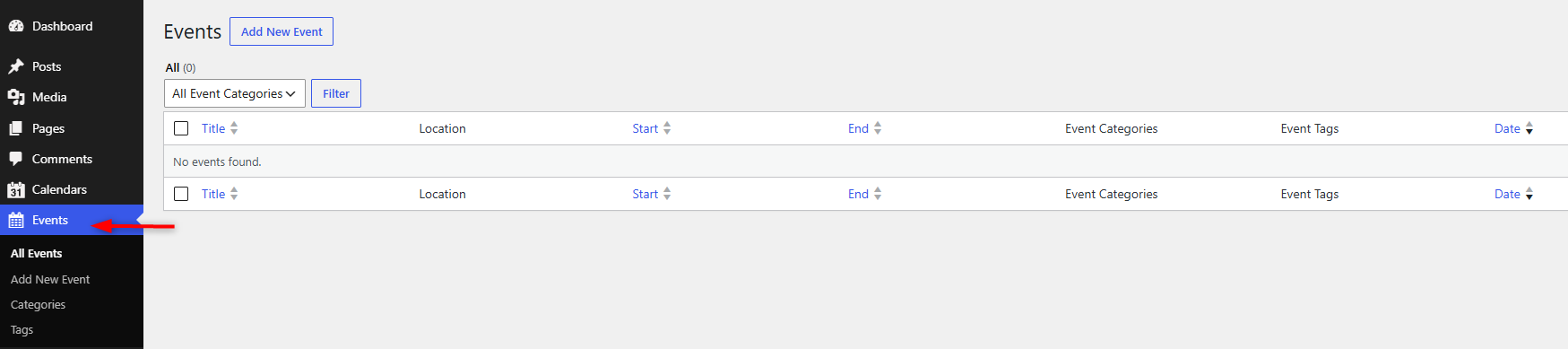
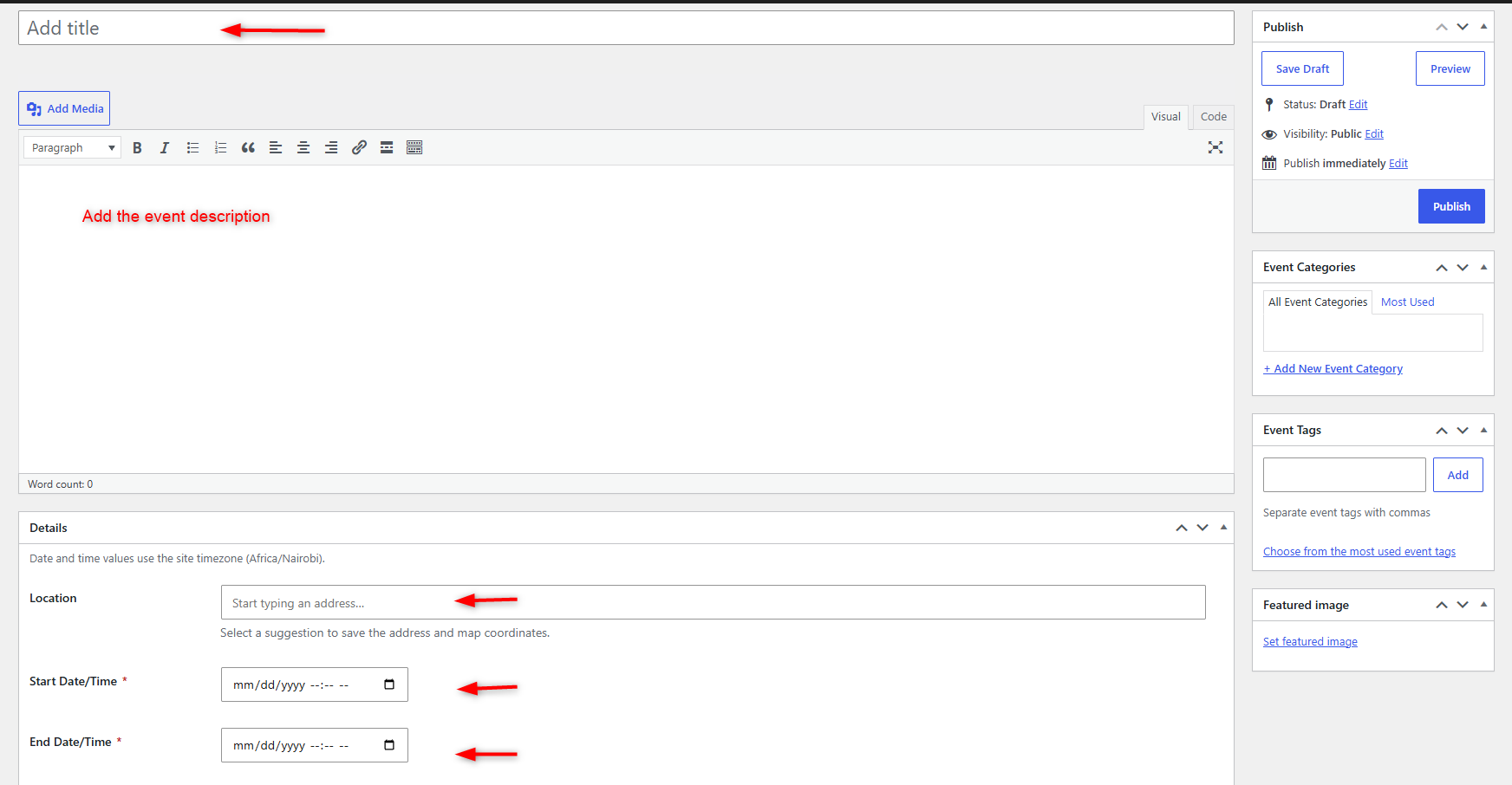
Go to Events → Add New Event in your dashboard. Here, you need to set the following details:
- Event Title
- Event Description
- Location
- Start Date/ Time
- End Date/ Time
You can also assign an Event Category and Event Tag to help organize your events. You can also add a featured image by simply clicking the ‘Set featured image’ option. Then, click Publish and repeat the same process to create as many events as you need.
Step 3: Create a calendar to display your events
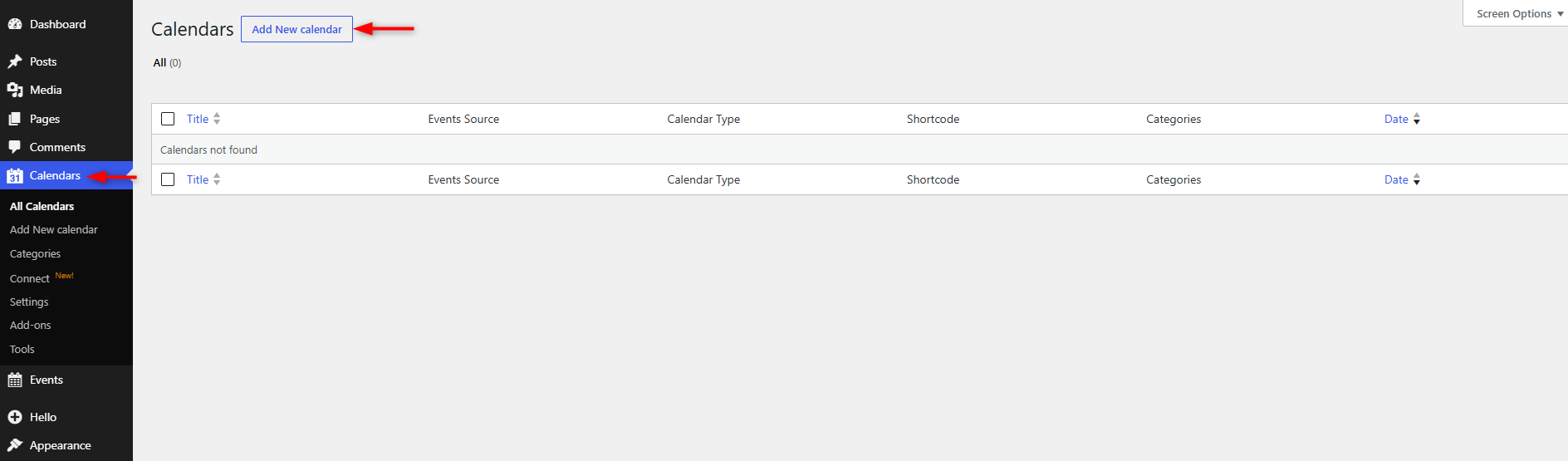
Go to Calendars → Add New Calendar. Give your calendar a title and add any event template tags you want to use. Choose SC Events in the Event Source dropdown. This tells Simple Calendar to pull from your locally created events instead of any external calendar application.
Step 4: Choose which events to show
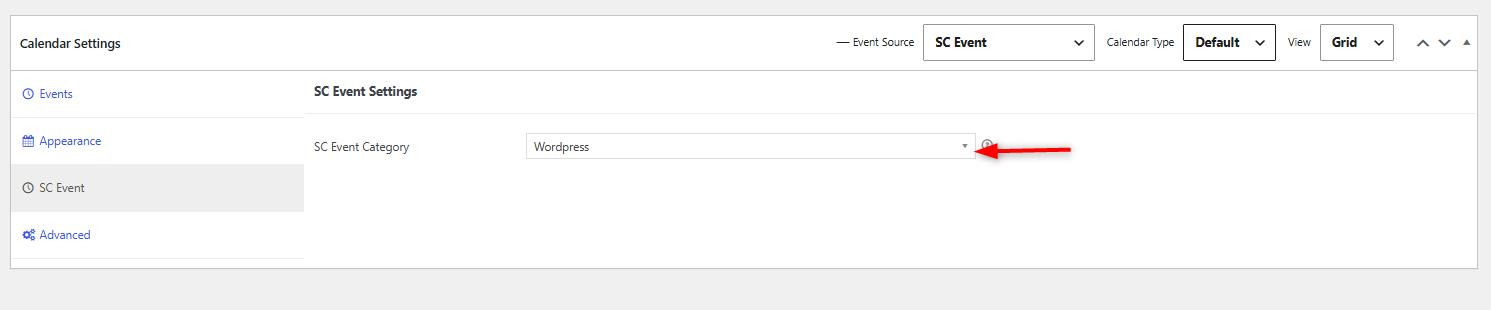
Go to the SC Event tab in your calendar settings. In the SC Event Category field, select the category whose events you want displayed on this calendar.
This means you can create multiple calendars, each showing events from a different category. A church site could have one calendar for services and another for youth group events. A venue could separate music events from private hire.
Step 5: Publish and preview
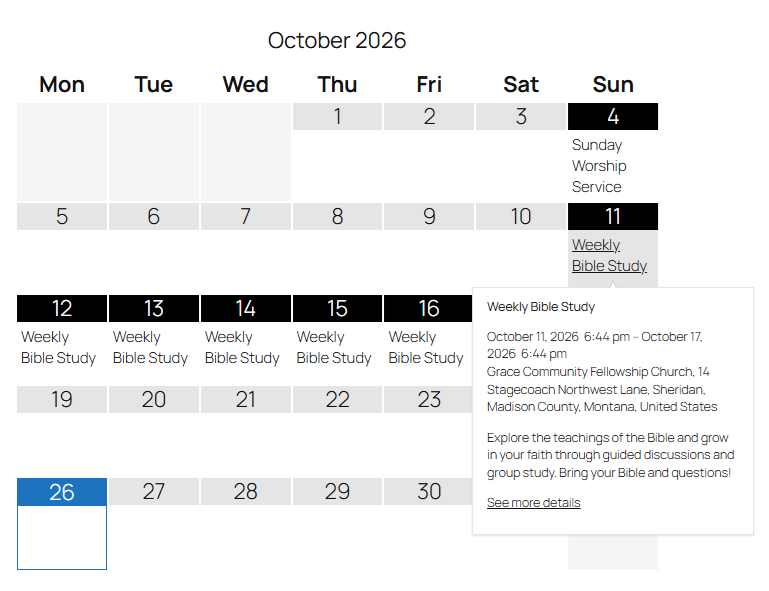
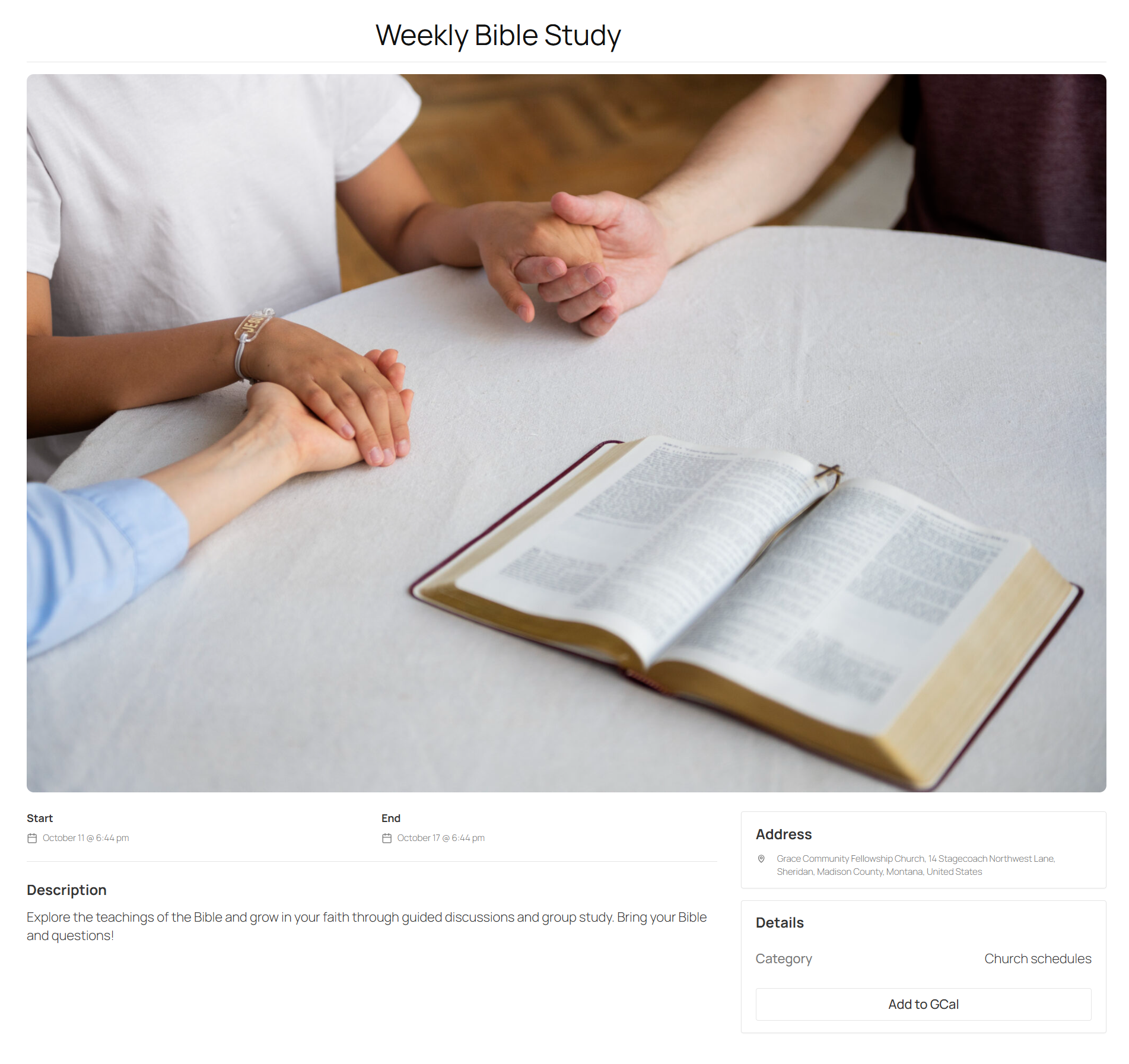
Click Publish on your calendar. You can preview it on the front end of your site to see how your locally created events should now appear on the calendar. When user clicks on ‘See more details’, the following event page details will appear.
Let visitors add events to Google Calendar
Even though your events are created in WordPress, visitors can still save them to their own Google Calendar. You have two options:
1. Add a link to the calendar view. Add the [add-to-gcal-link]Add to Google Calendar[/add-to-gcal-link] template tag to your calendar’s event template. Each event on the calendar will then show a link that opens the event in Google Calendar.

2. Use the single event page. Each event has its own page with an ‘Add to Gcal’ button built in. Visitors click it, and the event opens in Google Calendar in a new tab.
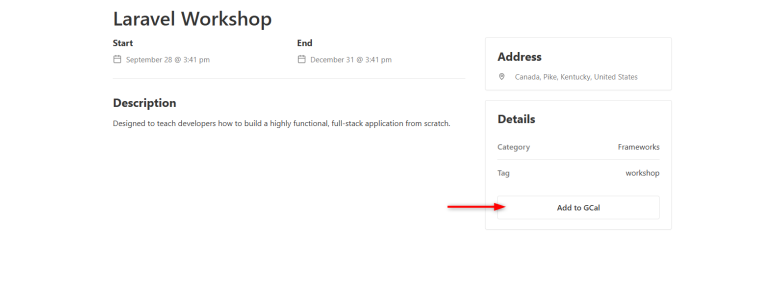
See the SC Events setup guide for the full documentation.
Start Creating Events in WordPress Today
If all you need is a way to list events on your site without setting up Google Calendar or installing a heavy event plugin, SC Events does the job.
It’s available in the free Simple Calendar plugin. Create events from your dashboard, organize them with categories, and display them on a calendar. Each event gets its own page you can share or link to.
Give it a try and see if it fits your workflow.
→ Download Simple Calendar for free on WordPress.org
Summarize with:
Frequently asked questions
Yes. With Simple Calendar’s SC Events feature, you can create events directly from your WordPress dashboard as a dedicated event post type. You don’t need a Google Calendar account, API key, or any external calendar app.
Not anymore. Simple Calendar started as a Google Calendar display plugin, but it now supports multiple event sources. You can pull events from Google Calendar, import them from an ICS feed, or create them locally in WordPress using SC Events. You can use any of these sources individually or mix them depending on your needs.
SC Events is a lightweight event post type that lets you create events, organize them with categories and tags, display them on a calendar, and give each event its own page. It doesn’t include venue management, organizer profiles, ticketing, or payment processing, as provided by The Events Calendar plugin. So, if you want to list events on your site without the extra overhead, SC Events keeps things simple.
Related posts
Simple plugin. Pro features. Easy from day one.
After 13 years of building a WordPress calendar plugin, we know a Google Calendar embed looks like the easy answer. But it rarely stays that way. It’s only after you embed the Google Calendar manually and open the page on your mobile that you realize the calendar decided to live by its own rules. A […]

Build A Simple Online Business Event With Simple Calendar More Visibility = More Clients = More Business = More Revenue It’s how people see, hear, and talk about your event manager business. And here’s the kicker… you control the narrative. A strong online presence helps you stand out from competitors and connect with potential customers. […]
We read the top 10 Google results for ‘best WordPress calendar plugin’ in September 2026. 8 of 10 recommended an event-management plugin to readers who only needed a display. But you already know it’s not enough for the specific choice you need to make. And that advice generally falls apart when you realize that each […]